Codecs
HAP / HAP Q / HAP Alpha, ProRes 422/4444, H.264, H.265, VP9 WebM, GIF, PNG sequence. CRF slider for H.264/H.265/VP9.
Example: 0 GBfor a 60s 4K clip as HAP Qsys:// video pipeline for vj workflows
Converts videos for VJ playback, archiving, web output and loops. One app, no terminal.
HAP · ProRes · H.264 · H.265 · VP9 · GIF · PNG-Seq // Luma/Chroma-Keying · 3D-LUT · Trim/Speed/Reverse · Crossfade-Loops · Batch
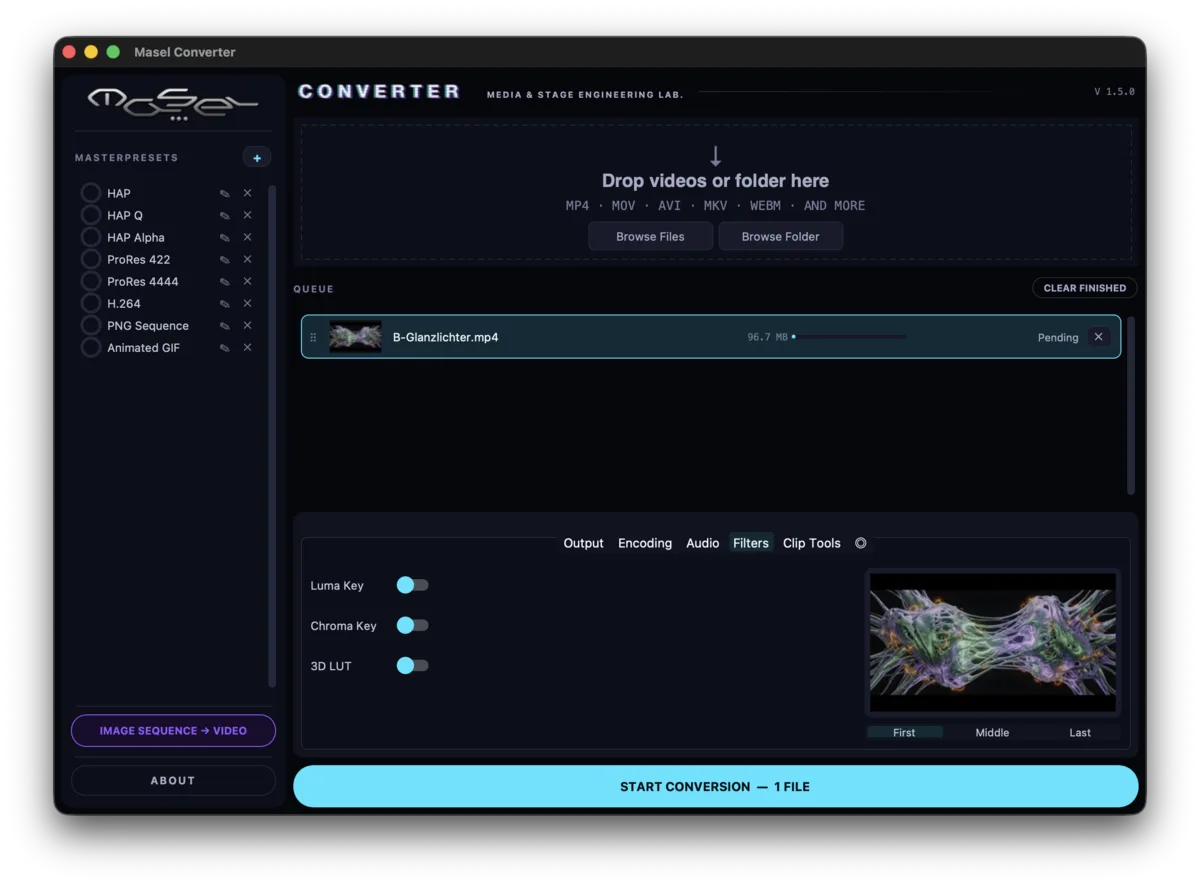
Six areas, all in the GUI — no FFmpeg command in the terminal needed.
HAP / HAP Q / HAP Alpha, ProRes 422/4444, H.264, H.265, VP9 WebM, GIF, PNG sequence. CRF slider for H.264/H.265/VP9.
Example: 0 GBfor a 60s 4K clip as HAP QLuma key, chroma key with despill, 3D LUT (.cube/.3dl) for color grading and Log→Rec.709 conversion.
Example: 0 sgreen-screen live previewTrim, speed 0.25×–4×, reverse, crossfade loop with phase-bar preview.
Example: 0max. crossfade loopOriginal / 4K / 1080p / 720p / 480p / Custom. 24 / 25 / 30 / 60 / 120 fps. Letterbox for mismatched aspect ratios.
Example: 0max. frame rateDrag-and-drop, whole folders, custom settings per job, retry, reorder by drag, output paths per job.
Example: 0clips without UI freezeMerge compatible jobs into one file (stream copy, no re-encode). Or render PNG sequences into a clip with FPS/duration/fade.
Example: 0with stream-copy mergeClick an area — instructions, tips, real-world examples.
Example: 4K footage for a Resolume live set → HAP Q. Output is .mov with real-time playback and no CPU load.
Example: Normalize clips in 4K, 1080p, 720p → 1920×1080 @ 30 fps.
Tip: HAP, GIF and PNG sequence never have audio.
Example: Silent HAP loop for audio-reactive triggers → HAP. Web clip with original sound → H.264 + AAC.
Tip: Keying needs an alpha codec: HAP Alpha, ProRes 4444 or PNG sequence.
Example: Green-screen performance as an overlay → HAP Alpha, chroma green, similarity 0.3, softness 0.05, despill on.
Tip: Loop is disabled for GIF/PNG sequence.
Example: Seamless 2-second loop → 8-frame crossfade, loop preview, render HAP.
Tip: Thumbnails are extracted serially and progress updates are throttled — even 50+ clips won't freeze the app.
Tip: If the path already exists, the app appends _2, _3 … — nothing is overwritten.